If you’ve ever seen someone post a photo of a $0.01 receipt from Dollar General, you’ve witnessed “penny shopping” in action. It’s one of the most popular tricks in the deal-hunting world, and it’s completely legal – you’re just very good at spotting inventory that the store is trying to clear out. Here’s how it actually works.
Check every shelf, check every row,
That’s how deals start to show.
What Is Penny Shopping?
Every so often, Dollar General runs an item down to $0.01 in its system before pulling it from shelves for good. This usually happens to discontinued products, seasonal leftovers, or things that just are not selling. Instead of manually clearing every price tag, the system drops the price to a penny as the final step before the item is removed – and if a shopper finds it and rings it up before an employee catches it, they get it for a cent.
Why Does Dollar General Do This?
It’s mostly about inventory management, not a reward program for shoppers. Stores need to clear out dead stock to make room for new products. The penny price is really just an internal signal telling employees the item is due to be pulled from the shelf and thrown out or donated. Ringing it up as a sale is legal and allowed – you are not doing anything wrong by buying it.
How to Spot a Penny Item
There is no sign anywhere that says “penny item.” Shoppers have to look for a few clues instead:
- Check the price tag for the markdown pattern – Dollar General typically drops a clearance item in stages: 20% off, then 50%, then 70%, then 90%, and finally down to a penny
- Look at the barcode – deal-hunting groups online track which starting digits tend to belong to penny items each week
- Focus on clearance shelves and end caps, especially older seasonal or holiday stock
- Most Dollar General stores do not have self-checkout, so scan the item with the in-app scanner in the Dollar General app before heading to the register – if it is a penny item, the app will show a price of $0.00
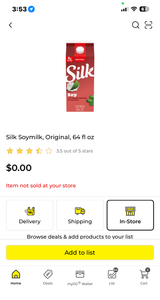
- Double check that the Dollar General app has your correct store location set – if it is showing the wrong store, the scanner can give you the wrong price entirely
Keep in mind that penny shopping is YMMV (your mileage may vary). What rings up as a penny at one store might still be full price a few miles away, even the same day. Inventory, markdowns, and timing are different at every location, so what works at your local store is not guaranteed to work everywhere.
Tips for Successful Penny Shopping
- Go early. Many employees pull penny items during opening tasks, so morning shoppers see the best selection.
- Check early Tuesday morning or Monday night. New penny lists usually update around then, so that is the best time to see what is fresh.
- Check more than one store. Inventory and markdown timing vary from location to location, even close by.
- Be polite at checkout. Some employees are not fans of penny shoppers. A friendly attitude goes a long way.
- Do not expect it every trip. Plenty of visits turn up nothing, and that is completely normal. Keep trying!!
A Few Honest Notes Before You Go
Penny shopping is never guaranteed, and store policy on honoring the penny price can vary or change without notice. Treat it as a fun bonus hunt, not something to plan around. And always be kind to employees – they are just doing their job, and a little patience makes the whole experience better for everyone.
Found a penny item on one of your own trips? We would love to hear about it – email your penny finds to hello@paigefinds.com and yours could be featured in a future post.
Pingback: Mega Clearance Cleanout Penny List: Starts Sept 4 - PaigeFinds
Pingback: Blue Star Toys Penny List - PaigeFinds
Pingback: Blue Star Barcodes - PaigeFinds
Pingback: Dollar General Penny List: Tuesday 9/8 - PaigeFinds
Pingback: Dollar General Penny List: Tuesday 9/15 - PaigeFinds